

Execution Logs
The Execution Logs section shows detailed log messages for each job execution. It helps administrators understand what happened during a job run, review execution steps, and quickly identify any issues.
Open Job Scheduler from the UnoPim sidebar and click Execution Logs to view the available log entries.
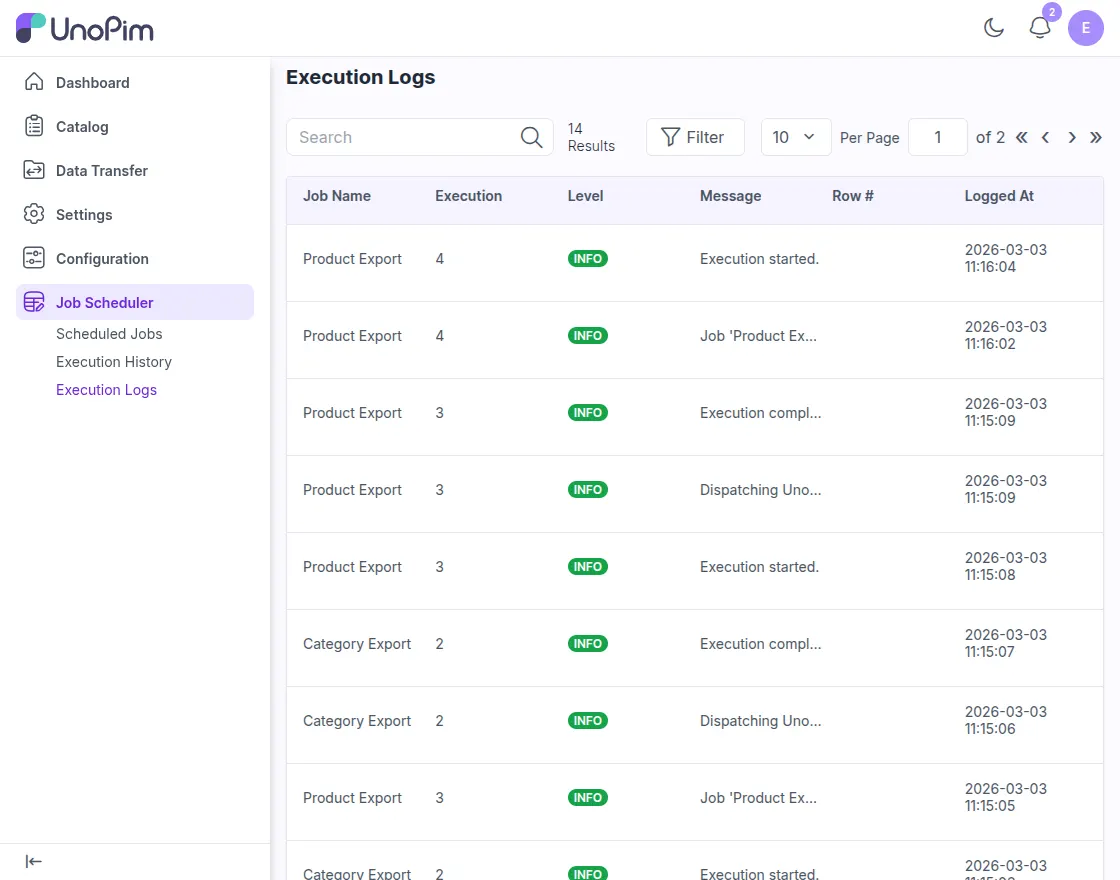
What You Can See in Execution Logs
Each row in the log grid represents a recorded event from a job execution. The following details are available:
| Column | Description |
|---|---|
| Job Name | Shows the name of the job, such as Product Export or Category Export. |
| Execution | Displays the execution ID of the job run. Each execution has its own unique number. |
| Level | Shows the log level, such as INFO, which indicates the type of log entry. |
| Message | Displays the log message that explains what happened during the execution, such as when the job started or completed. |
| Row # | Shows the row number related to the log message, if the log is tied to a specific record. |
| Logged At | Displays the date and time when the log entry was created. |
Why Use Execution Logs
You can use this section to:
- Track job activity step by step
- Review what happened during a specific execution
- Identify errors or failed records during processing
- Check whether a job started, completed, or stopped unexpectedly
Execution logs are especially useful when a scheduled import or export does not behave as expected and you need more detail than the execution summary screen provides.