

Other mapping
You can use the Other Mapping section to configure additional BigCommerce product fields that are not covered under Attribute Mapping.
Open it from: BigCommerce → Attribute Mappings → Other Mapping
Other mapping fields
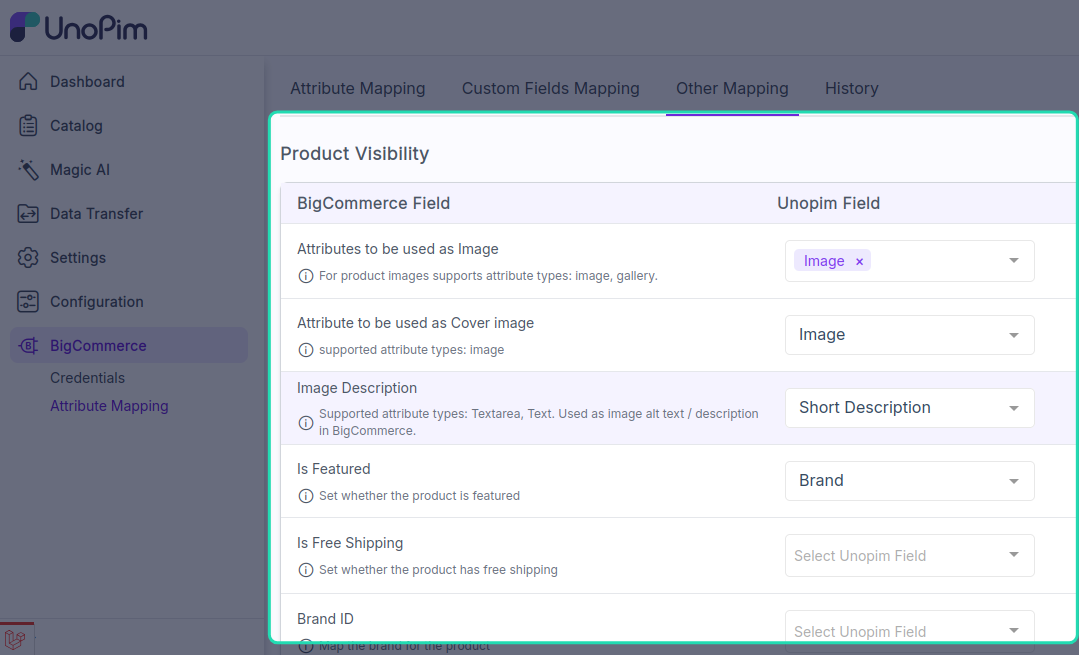
You can configure the following fields under Other Mapping:
Attributes to be used as ImageAttribute to be used as Cover ImageImage DescriptionIs FeaturedIs Free ShippingBrand Id
What this section does
These mappings help the connector send extra product details from UnoPim to BigCommerce during product export.
Attributes to be used as Imagelets you choose the attribute whose value should be used as the product image.Attribute to be used as Cover Imagelets you choose the attribute used as the main or cover image.Image Descriptionmaps the attribute used for image description text.Is Featuredmaps the value used to mark the product as featured in BigCommerce.Is Free Shippingmaps the value used to control free shipping for the product.Brand Idmaps the attribute used to assign the product to a BigCommerce brand.
Save the mapping
After configuring the fields, click Save. The updated mapping is used in the next product export run.