

Attribute Mapping
Map UnoPim product attributes to Odoo product fields before exporting products.
Overview
When you export products to Odoo, UnoPim uses your attribute mapping to decide which product data is sent to each Odoo field. Configure these mappings once so every export uses the same field alignment.
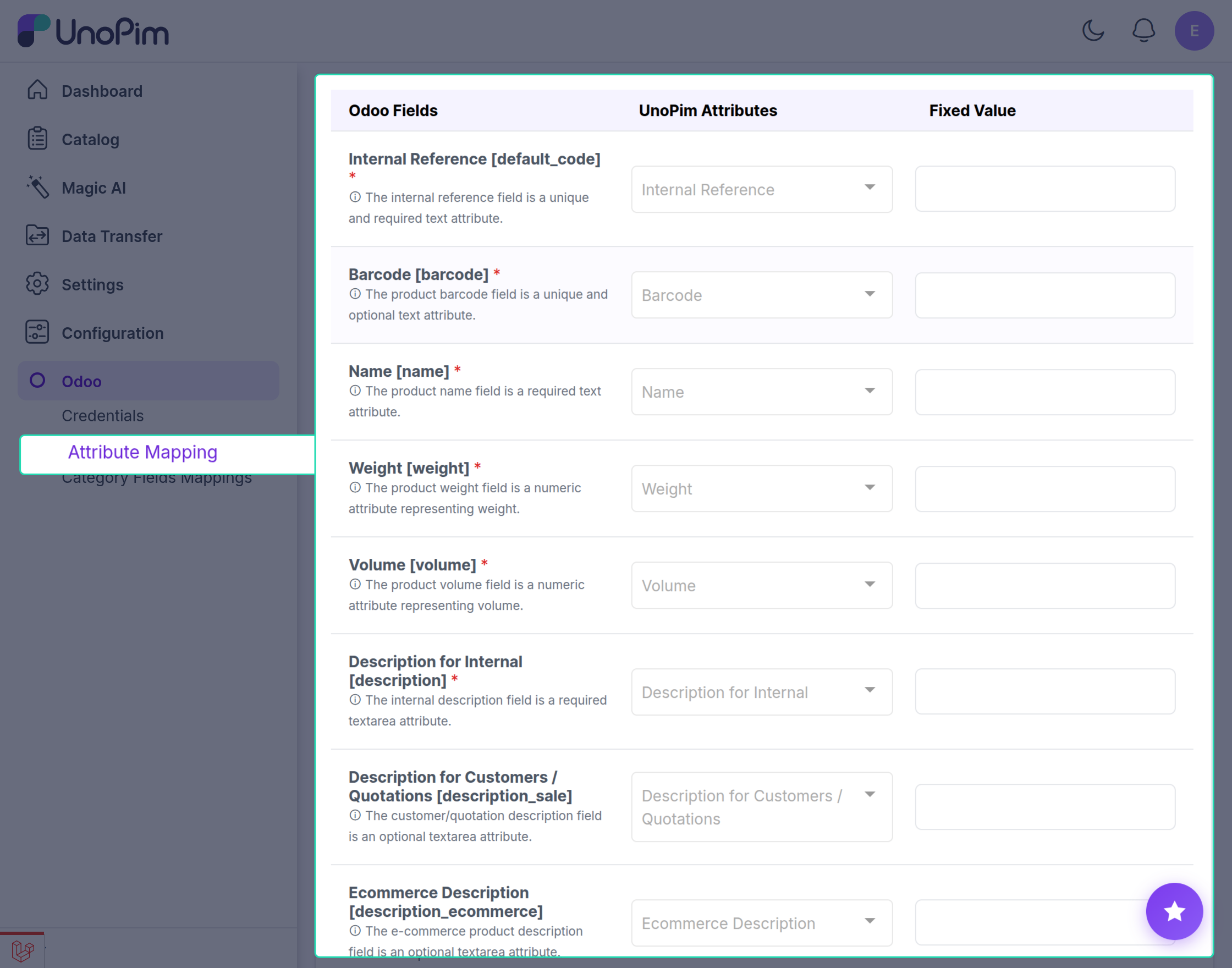
How the mapping screen works
The attribute mapping screen has three columns:
| Column | Purpose |
|---|---|
| Odoo Fields | Destination fields in Odoo where UnoPim data is written during export. |
| UnoPim Attributes | Source attributes in UnoPim. Choose the attribute that should populate each Odoo field. |
| Fixed Value | Optional default value applied to an Odoo field for every exported product, regardless of UnoPim data. |
Use Fixed Value when all exported products should share the same value for a specific Odoo field (for example, a default route or tax setting).
Default mappable product fields
The following Odoo product fields can be mapped to UnoPim attributes out of the box:
| Odoo field | Type | Notes |
|---|---|---|
| Internal Reference | Text | Unique, required identifier for the product. |
| Barcode | Text | Optional unique barcode. |
| Name | Text | Required product name. |
| Weight | Number | Product weight. |
| Volume | Number | Product volume. |
| Description for Internal | Textarea | Required internal description. |
| Description for Customers / Quotations | Textarea | Optional customer or quotation description. |
| Ecommerce Description | Textarea | Optional e-commerce description. |
| Description for Vendors | Textarea | Optional vendor description. |
| Description for Delivery Orders | Text | Optional delivery order notes. |
| Description for Receptions | Text | Optional reception notes. |
| Description for Internal Transfers / Pickings | Text | Optional internal transfer or picking notes. |
| Cost | Price | Required cost price. |
| Sale Price | Price | Required retail or sale price. |
| Can be Sold | Boolean | Required flag for sellable products. |
| Routes | Multi-select | Stock movement routes for the product. |
| Taxes | Multi-select | Customer or sales taxes applied to the product. |
| Purchase Taxes | Multi-select | Supplier or purchase taxes applied to the product. |
| Product Type | Selection | Defines the product category or type in Odoo. |
| Can be Purchased | Boolean | Required flag for purchasable products. |
| Images | Images | One or more product images. |
Configure attribute mapping
Step 1 - Open attribute mapping
In the Odoo connector settings, open the Attribute Mapping section.
Step 2 - Map Odoo fields to UnoPim attributes
For each Odoo field you want to export:
- Select the Odoo field (or confirm it is already listed).
- Choose the matching UnoPim attribute from the dropdown.
- Optionally enter a Fixed Value if every exported product should use the same value for that field.
Step 3 - Add more mappings
Repeat Step 2 for all required and optional fields you need in Odoo.
Step 4 - Save configuration
Click Save to store your mapping. New product exports will use this configuration.